
Small business team completing an AI readiness checklist in an Orange County office
5 min read
This article provides a five-step AI readiness checklist for Orange County businesses covering data quality, workflow mapping, budget, team skills, and leadership alignment before adopting AI tools. It includes a scorecard to help companies assess their AI maturity and a phased rollout approach to implement AI without disrupting operations.
Why does this happen? Most companies skip a proper AI readiness assessment. This checklist helps Orange County businesses determine true readiness for AI adoption. Complete this evaluation before investing in any AI-powered platform.
What Is an AI Readiness Assessment?
An AI readiness assessment reviews your data infrastructure, workflows, budget, and team capabilities. You complete this before adopting any AI tools. It answers one key question: can your business use AI effectively right now? For most small businesses, the honest answer is not yet.
Orange County has a growing tech scene. Because of this, local companies feel pressure to chase every new AI initiative. However, rushing into AI implementation without a proper framework often wastes budget and frustrates staff.
This AI readiness framework covers five areas: data, workflows, budget, skills, and leadership alignment. We built it from real client work with nonprofits, home service firms, and event platforms across Orange County.
Step 1: Check Your Data Quality and Infrastructure
Your data infrastructure is the foundation of any AI project. If information sits in scattered spreadsheets or an outdated CRM, AI models can’t generate reliable results. Data readiness means your information is clean, centralized, and formatted consistently.
Ask these questions first:
- Is customer data in one system, or spread across five tools?
- Do you have duplicate or missing records?
- Can your team export data without manual cleanup?
- Is sensitive data protected with proper access controls and data governance policies?
If you answered “no” to more than one, fix your data first. Legacy CRM systems rarely integrate well with modern AI capabilities. Weak data limits your results from day one, regardless of how advanced the AI system may be.
What Does AI-Ready Data Look Like?
AI-ready data is accurate, structured, and easily accessible. It typically lives in a modern CRM or cloud database, not scattered spreadsheets. Without this technology infrastructure, even a sophisticated AI model produces results you can’t trust.

Consultant guiding a business through an ai readiness assessment
Step 2: Map Your Workflows and Processes
Before adding AI, map your current workflows and processes on paper. This step reveals where repetitive tasks consume staff time. For instance, lead intake, scheduling, and follow-up are common automation targets for OC small businesses.
Try this exercise. List every task your team handles weekly. Then mark which ones follow a set pattern. Predictable tasks are easy to automate. Judgment calls are not.
| Workflow Type | AI Fit | Example |
|---|---|---|
| Repetitive, rule-based | High | Appointment reminders, data entry |
| Pattern-based decisions | Medium | Lead scoring, ticket routing |
| Judgment-heavy, relationship | Low | Contract talks, complex sales calls |
This exercise clarifies where an AI chatbot fits, and where it doesn’t. It also reveals which tasks a generative AI tool could accelerate, such as drafting emails or improving response times. Skipping this step often leads to weak AI capabilities later.
Step 3: Set a Realistic AI Budget
AI pricing varies significantly depending on scope. A basic chatbot costs far less than a custom AI model trained on your proprietary data. So, establish your budget before selecting a vendor.
Consider these cost factors:
- Setup and integration with existing technology infrastructure
- Ongoing subscription or hosting fees
- Workforce training time and change management costs
- Maintenance and future scalability needs
In general, start small with one workflow through pilot projects. Then scale AI based on measurable results. This structured approach keeps risk low, and it helps you track ROI before a full AI transformation.
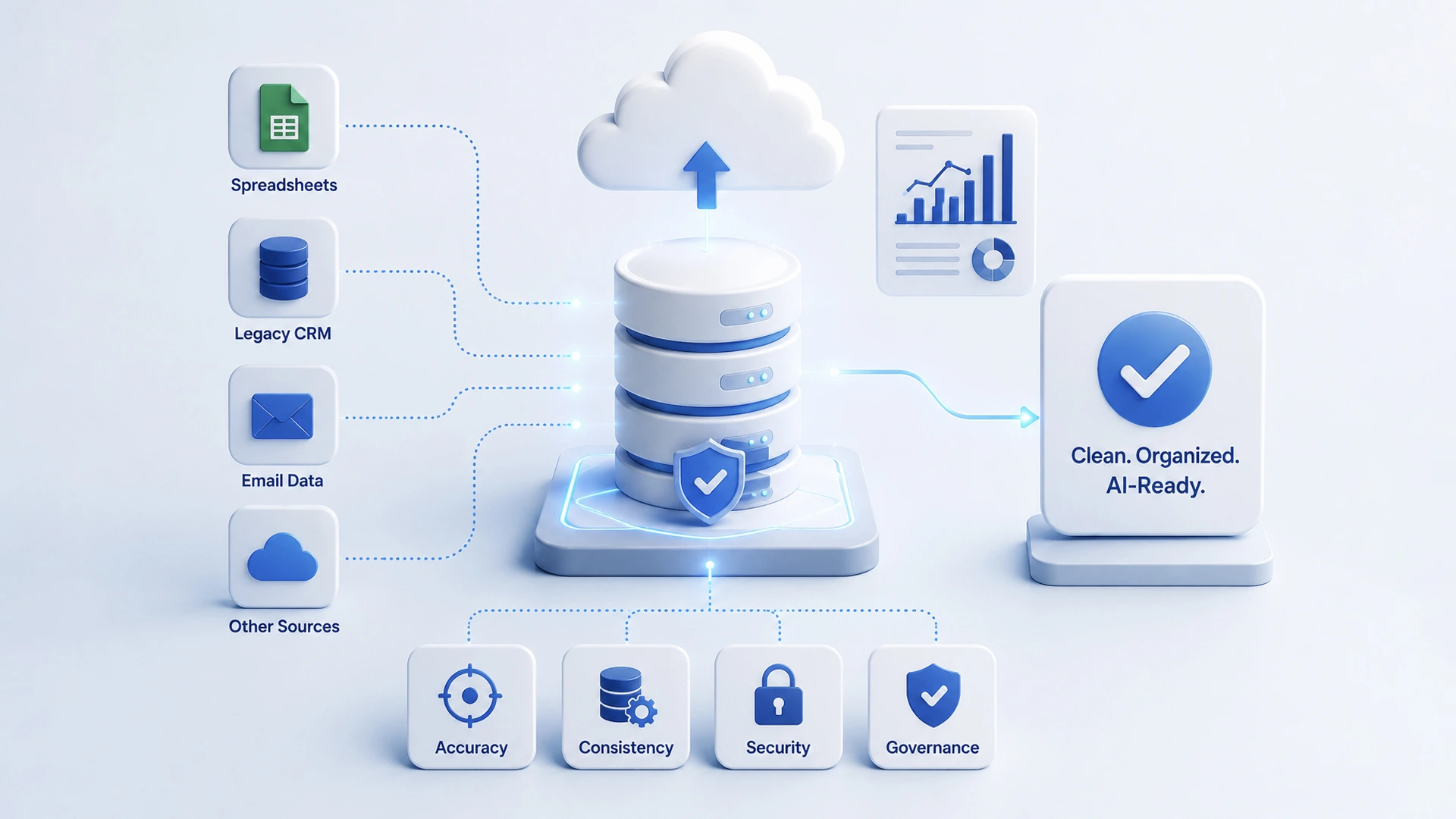
Data infrastructure audit for AI readiness in a small business
Step 4: Check Your Team’s Skills Gap and Culture
AI readiness isn’t only technical. Your organizational culture matters just as much as your software. Staff who fear job loss from AI adoption often resist quietly, and this slows the entire AI initiative.
First, check if staff understand basic AI concepts. Next, decide who will own the new tools daily. Finally, plan workforce training early. Comfort with AI grows through continuous learning and hands-on use, not one-time meetings.
Signs Your Team Isn’t Ready Yet
- Staff see AI as a threat, not a tool
- No one owns data entry accuracy today
- Leadership hasn’t explained the “why” behind AI adoption
- Training budget is zero
Addressing these signs early prevents failures that derail most AI implementations in year one. Closing the skills gap also builds genuine trust across your organization, strengthening overall AI maturity.
Step 5: Align Leadership on AI Strategy and Governance
Leadership alignment decides whether your AI strategy sticks or fades after the first setback. Executives must agree on business goals, risk tolerance, and who makes final calls. Without this alignment, AI projects often stall before scaling.
So, schedule a short leadership session. Cover three things: business goals alignment, acceptable risk levels, and a named project owner. This keeps your AI initiative tied to real business goals, not just emerging technology trends.
AI governance also covers risk management basics. This includes data privacy rules, vendor accountability, and a process to review AI outputs for accuracy. Without these guardrails, even well-built AI systems can create long-term liability for your business.

Team mapping workflows and processes before AI implementation
Your AI Readiness Checklist Scorecard
Score your business honestly in each category below. This scorecard gives you a clear picture of where your AI readiness stands today.
| Category | Not Started (0) | In Progress (1) | Ready (2) |
|---|---|---|---|
| Data quality and infrastructure | Scattered, messy | Partly centralized | Clean, centralized |
| Workflows and processes | Undocumented | Some mapped | Fully mapped |
| Budget | No plan | Rough estimate | Approved and phased |
| Team skills and culture | Resistant | Curious, untrained | Trained, supportive |
| Leadership alignment | No consensus | Partial agreement | Fully aligned |
Frequently Asked Questions
What is an AI readiness assessment?
An AI readiness assessment is a structured review of a business's data, workflows, budget, and team before adopting any AI tool. It determines whether a company can actually use AI effectively right now, covering five areas: data readiness, workflows, budget, skills gap, and leadership alignment.
What does AI ready data look like?
AI ready data is accurate, structured, and accessible in real time, typically stored in a modern CRM or cloud database rather than scattered spreadsheets. Without this foundation, even a well-built AI model will produce unreliable results.
How do I know which workflows are good candidates for AI automation?
Repetitive, rule-based tasks like appointment reminders and data entry have high automation fit, while pattern-based decisions like lead qualification have medium fit. Judgment-heavy, relationship-driven tasks like contract negotiation have low fit and are poor candidates for automation.
How much does AI implementation cost for a small business?
Costs vary widely depending on scope, from basic chatbots to custom machine learning models trained on proprietary data. Key cost factors include setup and integration, ongoing subscription or hosting fees, staff training, and maintenance, and starting with one workflow before scaling is recommended to keep risk low.
What are signs a team isn't ready for AI adoption?
Warning signs include staff viewing AI as a threat rather than a tool, no clear ownership of data entry accuracy, leadership failing to explain the reasoning behind AI adoption, and a training budget of zero. Addressing these issues early helps prevent change management failures that often derail AI projects in their first year.
How should a business implement AI after completing the readiness assessment?
The recommended approach is a phased rollout rather than an all-at-once implementation. This involves piloting one automation for 30 to 60 days, measuring time saved and error rates, training staff and gathering feedback, then expanding to additional workflows using lessons learned.
What score indicates a business is ready for AI?
Using the checklist scorecard across five categories (data, workflows, budget, team, leadership), each scored 0-2, a total score of 7 or higher suggests solid organizational AI readiness. A lower score indicates the business needs a focused improvement plan before adopting AI tools.